
Compliance tasks for 401(k) plan sponsors
I crafted dynamic content and collaborated on navigable UI strategy to guide users through their year-end compliance tasks.
online portal
strategy
dynamic content
UX writing
error messages
help content
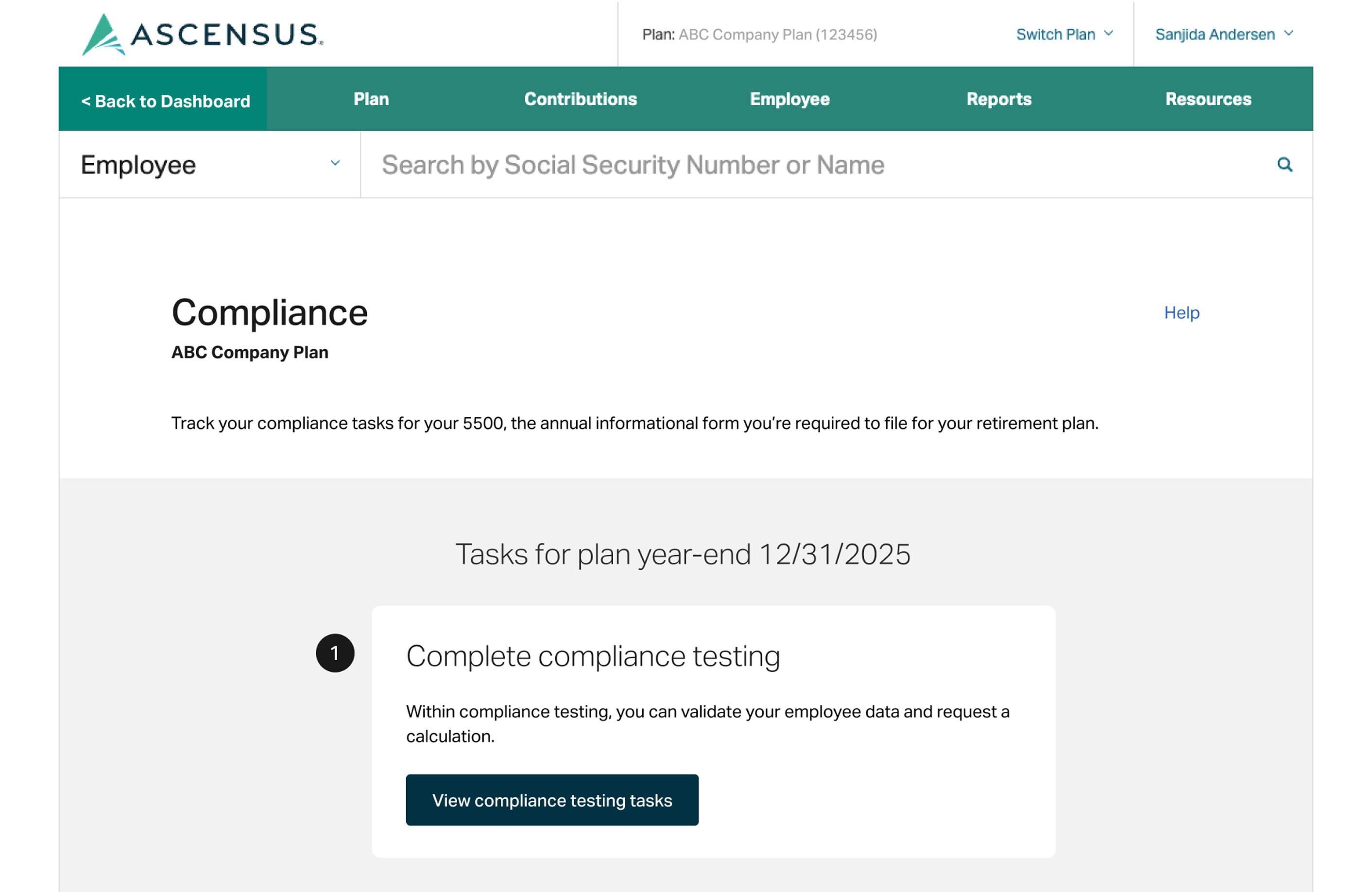
timeline
Project scope: Iterative launch schedule for compliance landing page


MVP 1 (Dec. 30, 2025)
Included compliance testing & questionnaire sections, document history links, & no tasks for plan messaging.

MVP 2 (Jan. 26, 2026)
5500 section (happy path for majority of plans + due dates including extension) & compliance testing alert banners, help modal.
MVP 3 (Feb.)
Included expanded 5500 section (all plan types) & error handling.
MVP 4 (June)
Document history section
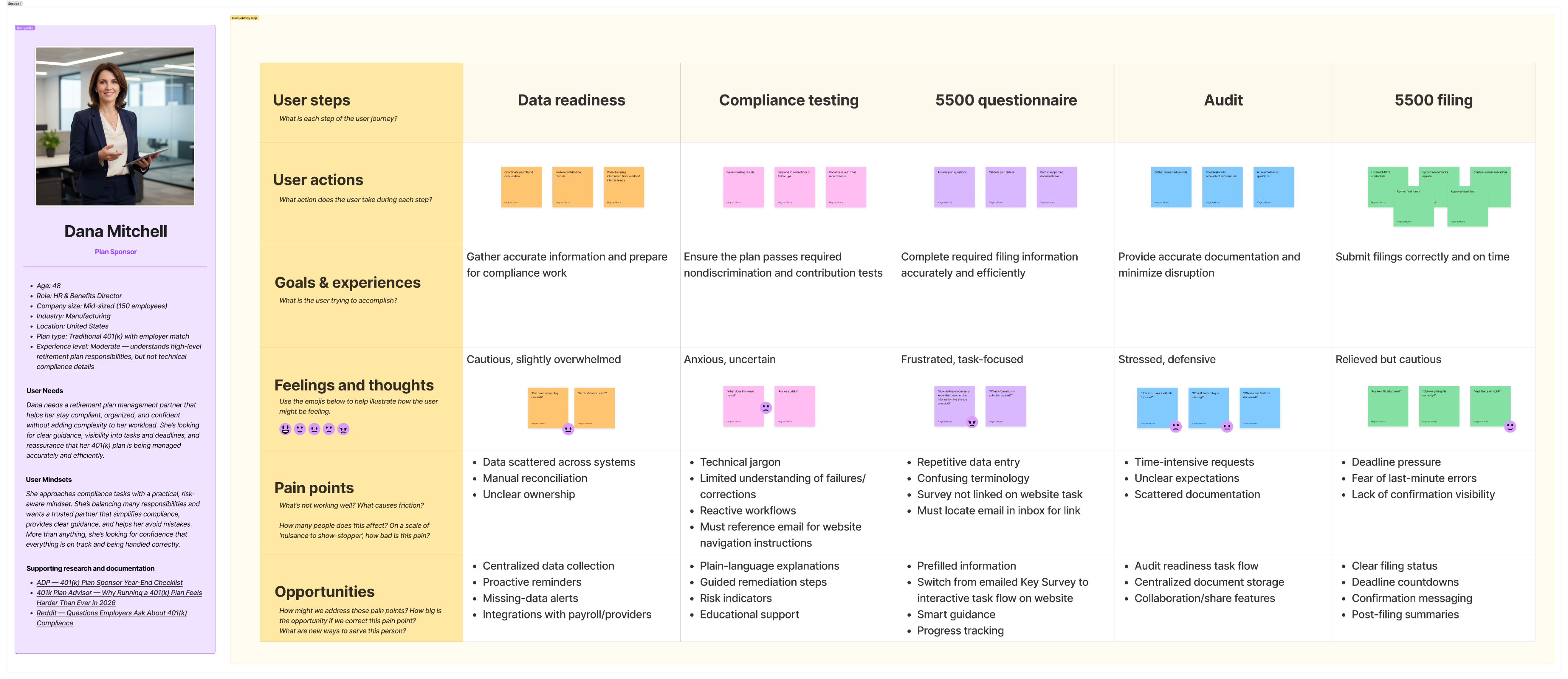
journey map
Understanding the compliance process from a user perspective
I did some research, online & through conversations with our service team, to get a better sense of the typical path plan sponsors take to complete all of their compliance tasks. I used the information gathered to create a user profile & journey map.
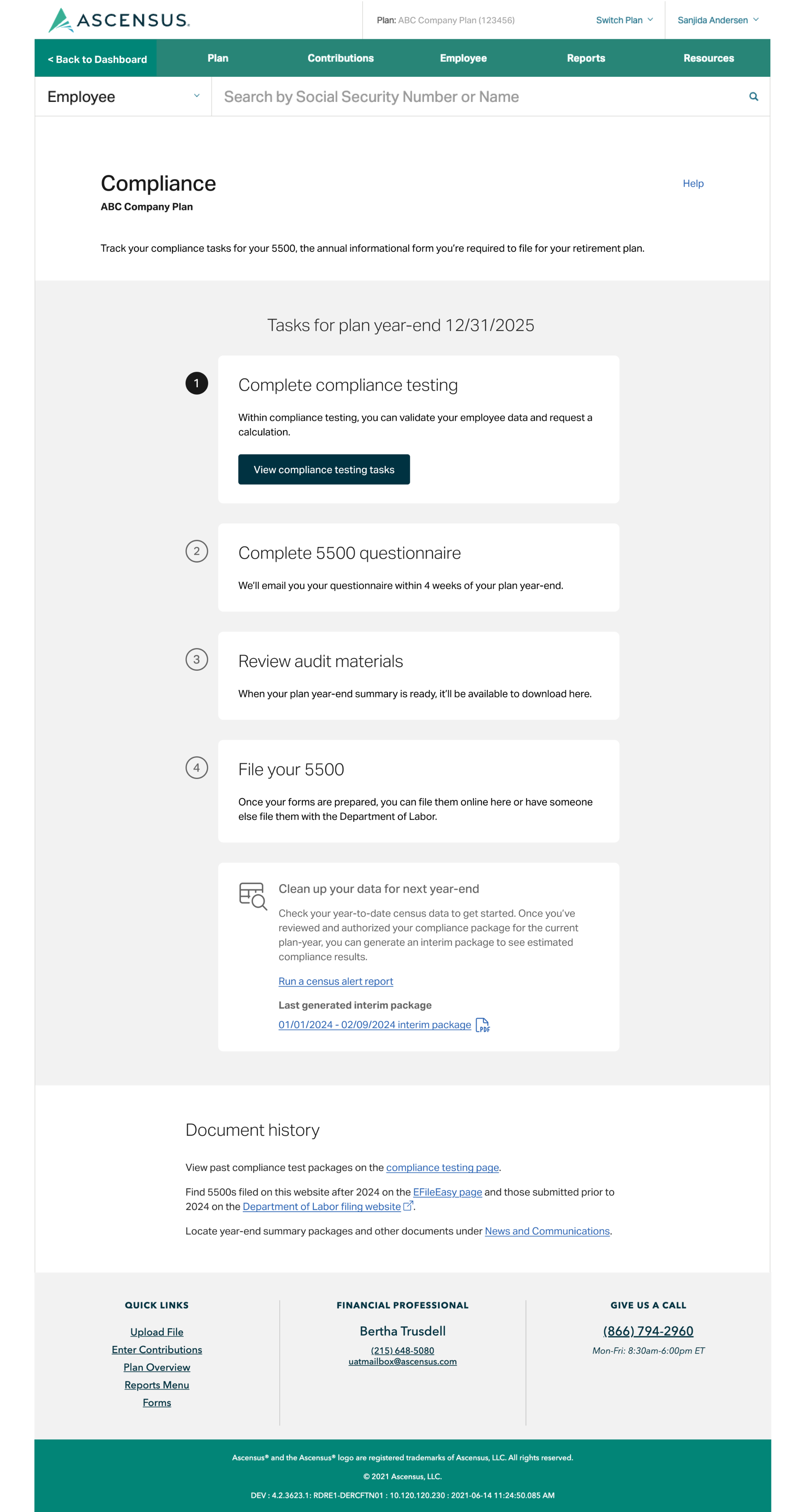
tasks list
Introducing a timeline list view for year-end compliance tasks
As the content specialist assigned to support this effort, my part included:
- Providing input & feedback relative to information hierarchy and content placement
- Putting together a copy deck with all of the text to appear on screen for the different scenarios
- Collaborating with stakeholders, the UX designer, and dev team to align on strategy for meeting requirements and addressing gaps identified in QA testing
Mockup for a large ERISA plan with a 12/31 plan year-end

General CTA
There wasn’t time to test more specific callouts for users missing data, so I rewrote the CTA to be more general since some users can’t “complete” this task just yet.
Placeholder document history
I added in links to where users could find different documents until the creation of this seciton

Description
I had drafted more specific language to accomodate
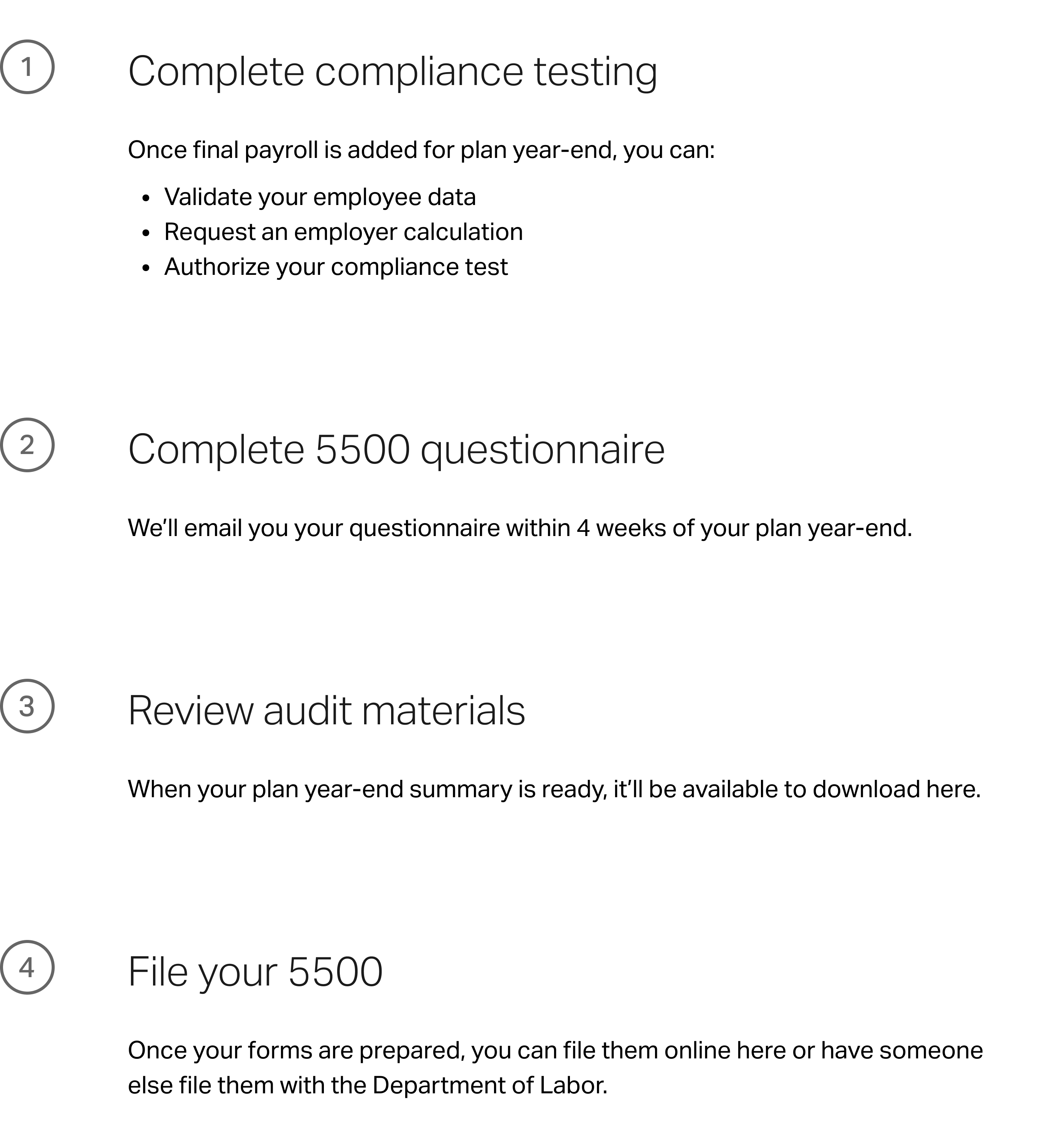
Customized tasks for specific plan types
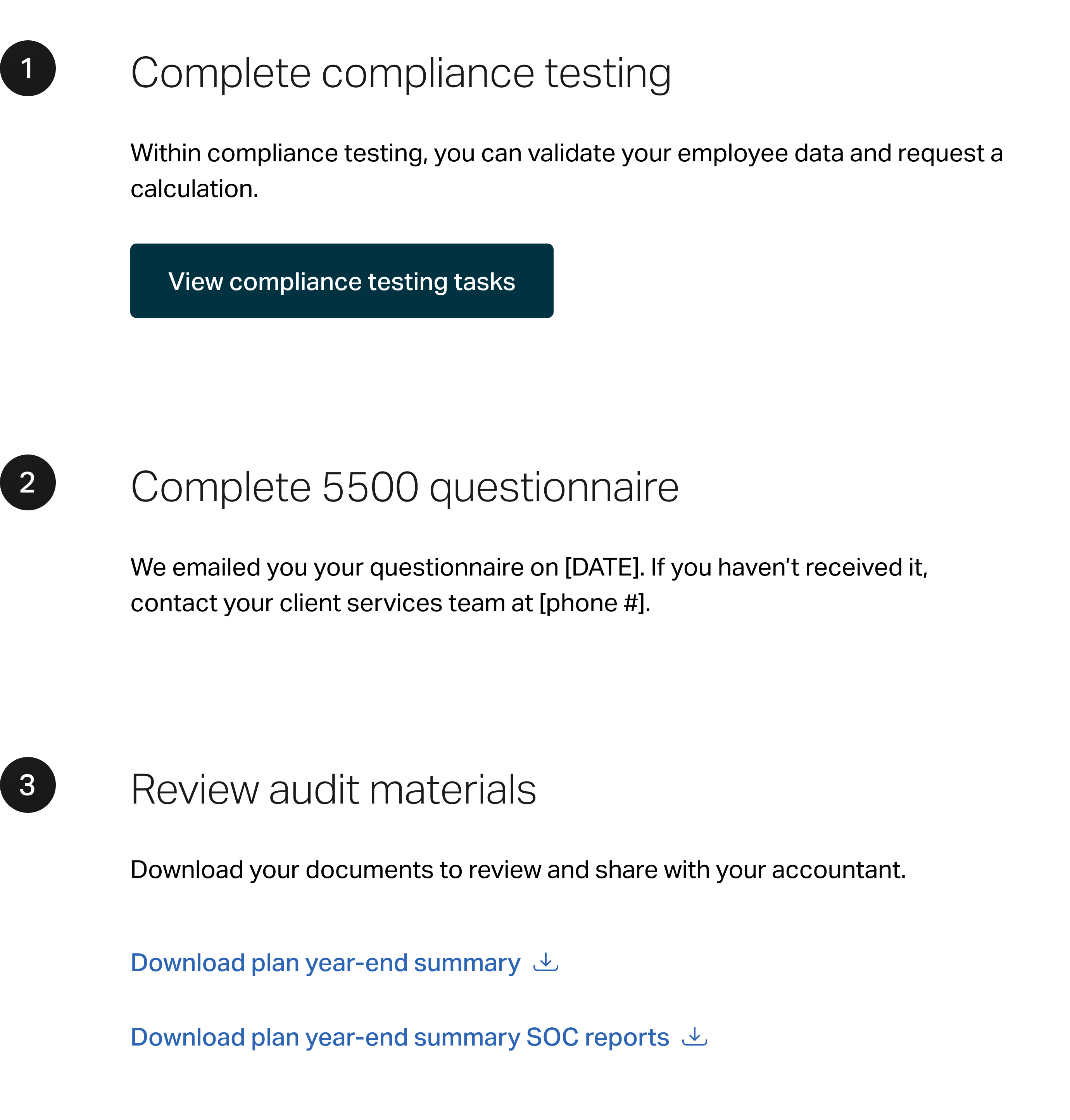
The review audit materials task only appears for large plans since it’s only applicable to them. The task list numbers aren’t tied to specific tasks, but instead to the number of tasks for that plan type.
Establishing patterns for task messaging
For the coming soon tasks, I wrote the headers as overarching task CTAs & a description about what they can expect.
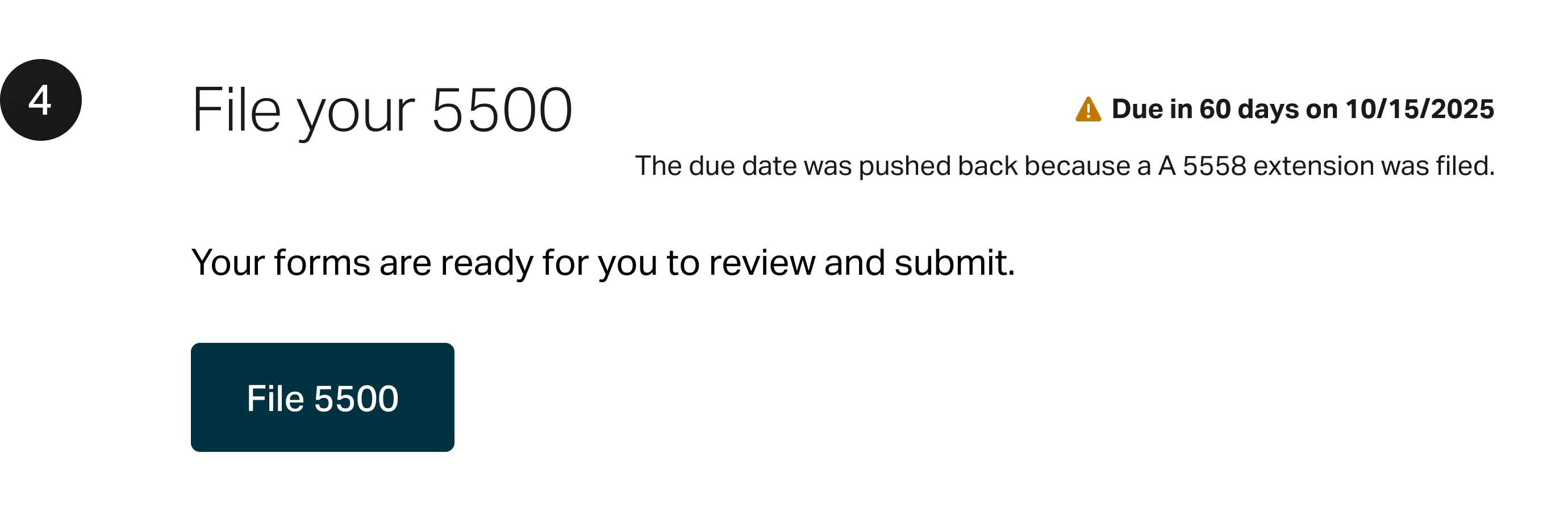
The UX designer and I proposed adding a due date countdown. There were scope constraints and technical challenges with implementing it for the compliance testing and questionnaire tasks, but we were able to add it for the File your 5500 task.
The UX designer and I also proposed adding a due date countdown. There were scope constraints and technical challenges with implementing it for compliance testing and the questionnairem, but we were able to add it for the File your 5500 task.
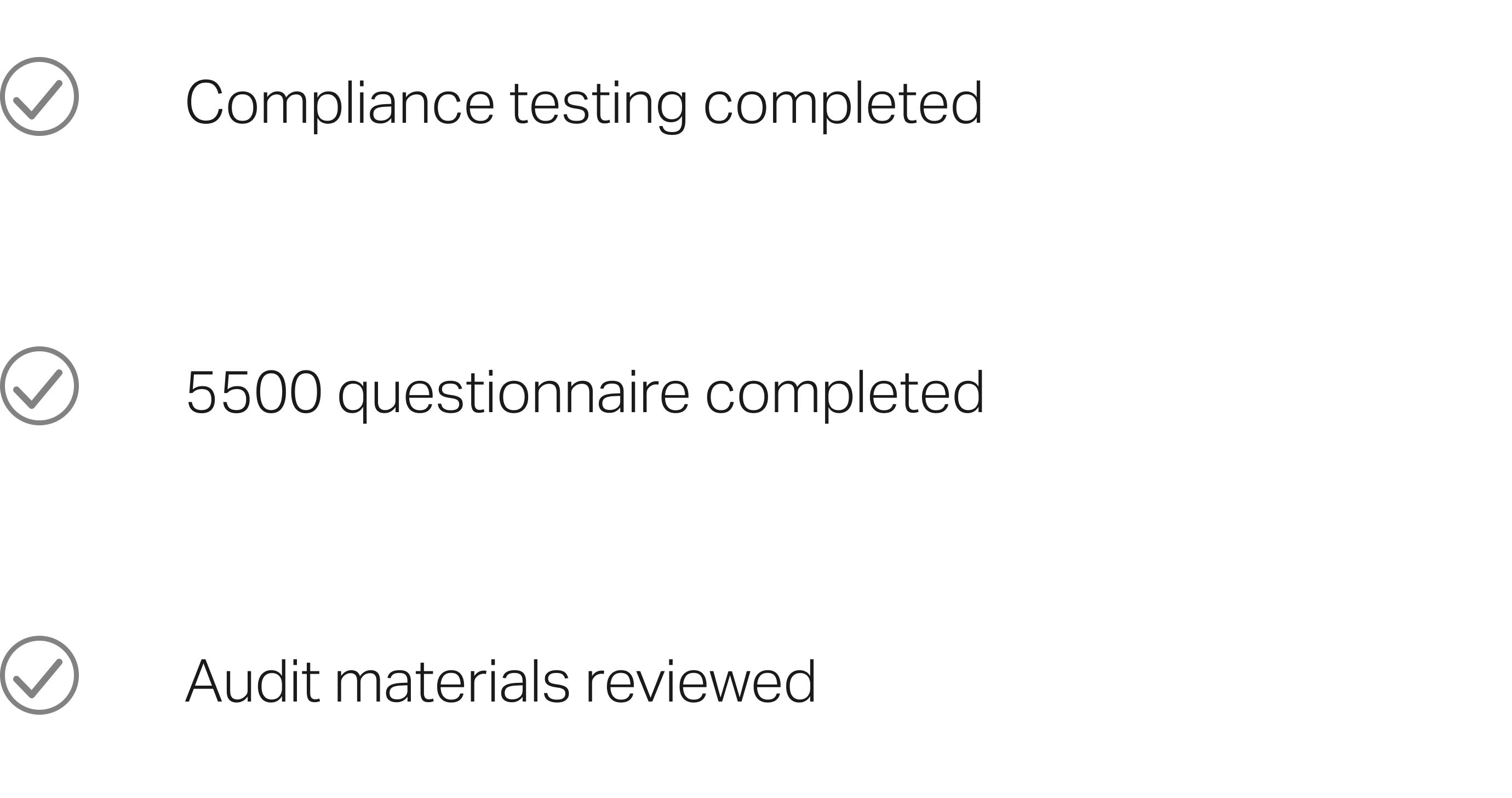
For the task complete headers, I formatted them as task noun + past tense verb to set them apart.
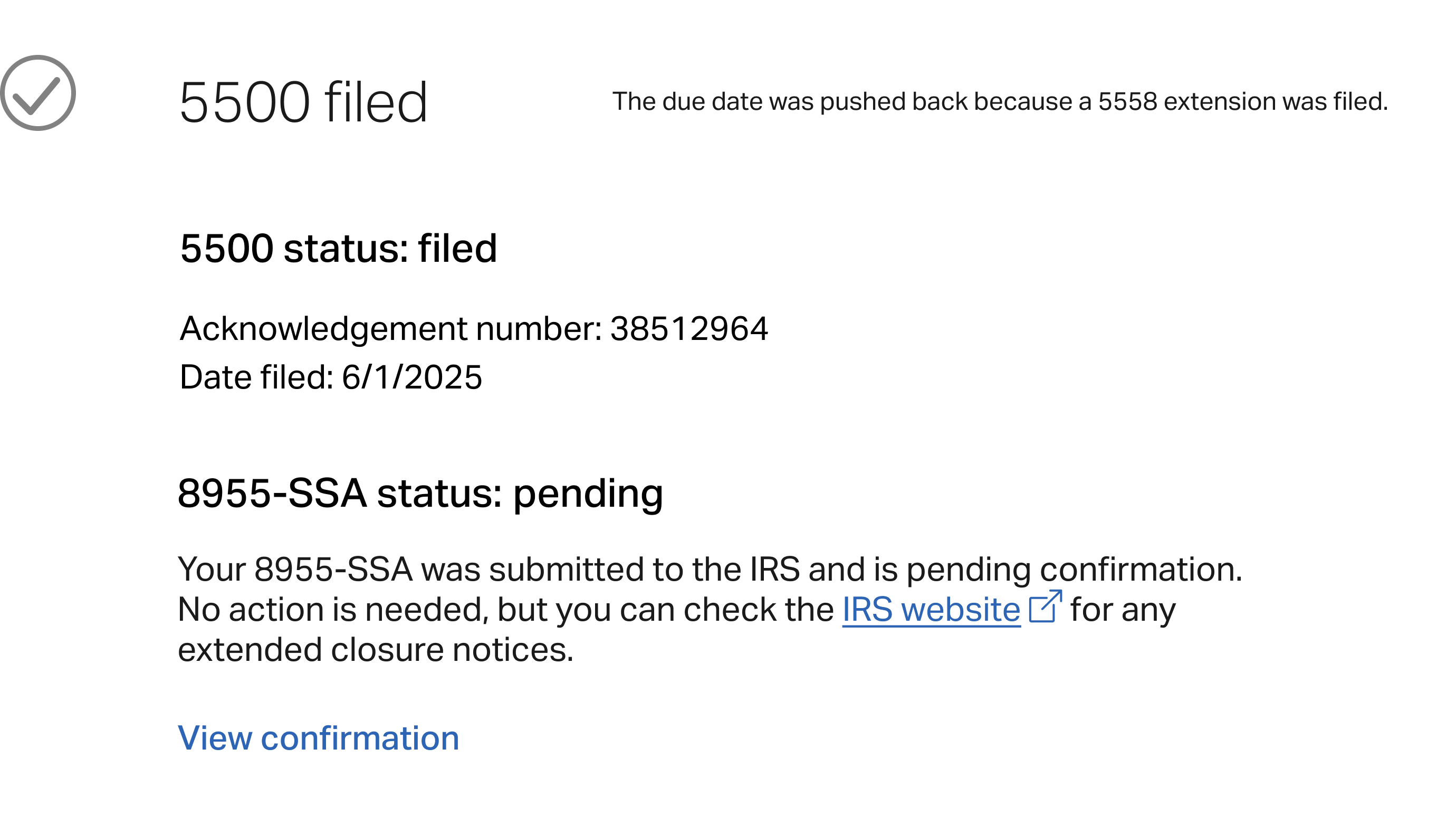
For the 5500 filing task, I also included confirmation details so users can check their form status & have an entry point to their confirmation details page.
For the 5500 filing task, I also included confirmation details so users can check their form status & have an entry point to their confirmation details page.
A sample from the copy deck
(#)
Coming soon
Available task
Task complete
H3: File your 5500
Body copy: Once your forms are prepared, you file them online here.
or
Once your forms are prepared, you file them online here or have someone else file them with the Department of Labor.
or
You indicated that someone else will complete and file your 5500 with the Department of Labor.
H3: File your 5500
Body copy: Your forms are ready for you to review and submit.
Button: File 5500
H3: 5500 filed
Body copy: Acknowledgement number: [#]
or
5500 status: Filed
Acknowledgement number: [#]
Date filed: [MM/DD/YYYY]
8955-SSA status: [Filed/Pending]
Acknowledgement number: [#]
Date filed: [MM/DD/YYYY]
Due in [#] days on [MM/DD/YYYY]
If extension was filed: The due date was pushed back because a 5558 extension was filed.
credits
Team & tool acknowledgements
in collaboration with Ascensus
UX writing by Meg Morris
UX design by Bethany Schramm
designed in FIGMA
copy docs created in Microsoft Word
development by TEAM BLUE & SPARTANS


beyond the scope
Learnings & looking ahead
Here’s a recap of a few things we noted for future exploration:
- Additional compliance testing task messaging to provide clarity for missing data or corrective action scenarios
- Consolidated guidance through the compliance testing steps on this page, potentially eliminating the need for a seperate page for compliance tasks
- Adding downloadable compliance-related documents to the document history section
Note: Prioritization of these will be based on user feedback, overall impact, &, of course, shifting business objectives.


Let’s connect


Compliance tasks for 401(k) plan sponsors
I crafted dynamic content and collaborated on navigable UI strategy to guide users through their year-end compliance tasks.
online portal
strategy
dynamic content
UX writing
error messages
help content
timeline
Project scope: Iterative launch schedule for compliance landing page
MVP 1 (Dec. 30, 2025)
Included compliance testing & questionnaire sections, document history links, & no tasks for plan messaging.
MVP 2 (Jan. 26, 2026)
5500 section (happy path for majority of plans + due dates including extension) & compliance testing alert banners, help modal.
MVP 3 (Feb.)
Included expanded 5500 section (all plan types) & error handling.
MVP 4 (June)
Document history section
journey map
Understanding the compliance process from a user perspective
I did some research, online & through conversations with our service team, to get a better sense of the typical path plan sponsors take to complete all of their compliance tasks. I used the information gathered to create a user profile & journey map.
tasks list
Introducing a timeline list view for year-end compliance tasks
As the content specialist assigned to support this effort, my part included:
- Providing input & feedback relative to information hierarchy and content placement
- Putting together a copy deck with all of the text to appear on screen for the different scenarios
- Collaborating with stakeholders, the UX designer, and dev team to align on strategy for meeting requirements and addressing gaps identified in QA testing
Mockup for a large ERISA plan with a 12/31 plan year-end
General CTA
There wasn’t time to test more specific callouts for users missing data, so I rewrote the CTA to be more general since some users can’t “complete” this task just yet.
Placeholder document history
I added in links to where users could find different documents until the creation of this seciton
Description
I had drafted more specific language to accomodate
Customized tasks for specific plan types
The review audit materials task only appears for large plans since it’s only applicable to them. The task list numbers aren’t tied to specific tasks, but instead to the number of tasks for that plan type.
Establishing patterns for task messaging
For the coming soon tasks, I wrote the headers as overarching task CTAs & a description about what they can expect.
The UX designer and I proposed adding a due date countdown. There were scope constraints and technical challenges with implementing it for the compliance testing and questionnaire tasks, but we were able to add it for the File your 5500 task.
The UX designer and I also proposed adding a due date countdown. There were scope constraints and technical challenges with implementing it for compliance testing and the questionnairem, but we were able to add it for the File your 5500 task.
For the task complete headers, I formatted them as task noun + past tense verb to set them apart.
For the 5500 filing task, I also included confirmation details so users can check their form status & have an entry point to their confirmation details page.
For the 5500 filing task, I also included confirmation details so users can check their form status & have an entry point to their confirmation details page.
A sample from the copy deck
(#)
Coming soon
Available task
Task complete
H3: File your 5500
Body copy: Once your forms are prepared, you file them online here.
or
Once your forms are prepared, you file them online here or have someone else file them with the Department of Labor.
or
You indicated that someone else will complete and file your 5500 with the Department of Labor.
H3: File your 5500
Body copy: Your forms are ready for you to review and submit.
Button: File 5500
H3: 5500 filed
Body copy: Acknowledgement number: [#]
or
5500 status: Filed
Acknowledgement number: [#]
Date filed: [MM/DD/YYYY]
8955-SSA status: [Filed/Pending]
Acknowledgement number: [#]
Date filed: [MM/DD/YYYY]
Due in [#] days on [MM/DD/YYYY]
If extension was filed: The due date was pushed back because a 5558 extension was filed.
credits
Team & tool acknowledgements
in collaboration with Ascensus
UX writing by Meg Morris
UX design by Bethany Schramm
designed in FIGMA
copy docs created in Microsoft Word
development by TEAM BLUE & SPARTANS
beyond the scope
Learnings & looking ahead
Here’s a recap of a few things we noted for future exploration:
- Additional compliance testing task messaging to provide clarity for missing data or corrective action scenarios
- Consolidated guidance through the compliance testing steps on this page, potentially eliminating the need for a seperate page for compliance tasks
- Adding downloadable compliance-related documents to the document history section
Note: Prioritization of these will be based on user feedback, overall impact, &, of course, shifting business objectives.
Let’s connect

Compliance tasks for 401(k) plan sponsors
I crafted dynamic content and collaborated on navigable UI strategy to guide users through their year-end compliance tasks.
online portal
strategy
dynamic content
UX writing
error messages
help content
timeline
Project scope: Iterative launch schedule for compliance landing page
MVP 1 (Dec. 30, 2025)
Included compliance testing & questionnaire sections, document history links, & no tasks for plan messaging.
MVP 2 (Jan. 26, 2026)
5500 section (happy path for majority of plans + due dates including extension) & compliance testing alert banners, help modal.
MVP 3 (Feb.)
Included expanded 5500 section (all plan types) & error handling.
MVP 4 (June)
Set to include expanded document history section.
journey map
Understanding the compliance process from a user perspective
I did some research, online & through conversations with our service team, to get a better sense of the typical path plan sponsors take to complete all of their compliance tasks. I used the information gathered to create a user profile & journey map.
tasks list
Introducing a timeline list view for year-end compliance tasks
As the content specialist assigned to support this effort, my part included:
- Providing input & feedback relative to information hierarchy and content placement
- Putting together a copy deck with all of the text to appear on screen for the different scenarios
- Collaborating with stakeholders, the UX designer, and dev team to align on strategy for meeting requirements and addressing gaps identified in QA testing
Mockup for a large ERISA plan with a 12/31 plan year-end
General CTA
There wasn’t time to test more specific callouts for users missing data, so I rewrote the CTA to be more general since some users can’t “complete” this task just yet.
Placeholder document history
I included links to pages containing compliance-related documents since building out a document downloads interaction was a future scope.
Description
I level set what users can expect to get from this page.
Customized tasks for specific plan types
The review audit materials task only appears for large plans since it’s only applicable to them. The task list numbers aren’t tied to specific tasks, but instead to the number of tasks for that plan type.
Establishing patterns for task messaging
For the coming soon tasks, I wrote the headers as overarching task CTAs & a description about what they can expect.
For the available tasks, I also went with a CTA header + button CTA (if applicable). I also included a description with any additional details or instructions.
The UX designer and I proposed adding a due date countdown. There were scope constraints and technical challenges with implementing it for the compliance testing and questionnaire tasks, but we were able to add it for the File your 5500 task.
For the task complete headers, I formatted them as task noun + past tense verb to set them apart.
For the 5500 filing task, I also included confirmation details so users can check their form status & have an entry point to their confirmation details page.
For the 5500 filing task, I also included confirmation details so users can check their form status & have an entry point to their confirmation details page.
A sample from the copy deck
(#)
Coming soon
Available task
Task complete
H3: File your 5500
Body copy: Once your forms are prepared, you file them online here.
or
Once your forms are prepared, you file them online here or have someone else file them with the Department of Labor.
or
You indicated that someone else will complete and file your 5500 with the Department of Labor.
H3: File your 5500
Body copy: Your forms are ready for you to review and submit.
Button: File 5500
H3: 5500 filed
Body copy: Acknowledgement number: [#]
or
5500 status: Filed
Acknowledgement number: [#]
Date filed: [MM/DD/YYYY]
8955-SSA status: [Filed/Pending]
Acknowledgement number: [#]
Date filed: [MM/DD/YYYY]
Due in [#] days on [MM/DD/YYYY]
If extension was filed: The due date was pushed back because a 5558 extension was filed.
credits
Team & tool acknowledgements
in collaboration with Ascensus
UX writing by Meg Morris
UX design by Bethany Schramm
designed in FIGMA
copy docs created in Microsoft Word
development by TEAM BLUE & SPARTANS


beyond the scope
Learnings & looking ahead
Here’s a recap of a few things we noted for future exploration:
- Additional compliance testing task messaging to provide clarity for missing data or corrective action scenarios
- Consolidated guidance through the compliance testing steps on this page, potentially eliminating the need for a separate page for compliance tasks
- Adding downloadable compliance-related documents to the document history section
- Creation of a integratabtle questionnaire flow
Note: Prioritization of these will be based on user feedback, overall impact, &, of course, shifting business objectives.
Let’s connect